Tests with Calculated Results
There are currently three test types that allow you to calculate test results using snippets of Python code. These tests include Composite, String Composite & Upload.
Composite Tests
Composite tests allow you to do calculations to produce a numberical test result based on other test values ( e.g. to calculate a dose based on a raw electrometer reading and temperature & pressure ). When you select Composite for the test Type field, a Calculation Procedure box will be displayed.
In this box you must enter a snippet of Python code where you must set the value of this tests macro name. Two examples are shown below, first, a one liner to calculate a temperature-pressure correction factor:
Note that in QATrack+ versions prior to 0.2.7 the last line of code had to be a line that set a``result`` variable to the final calculated result. This is no longer the recommended way to use composite tests although it is still supported for backwards compatability.
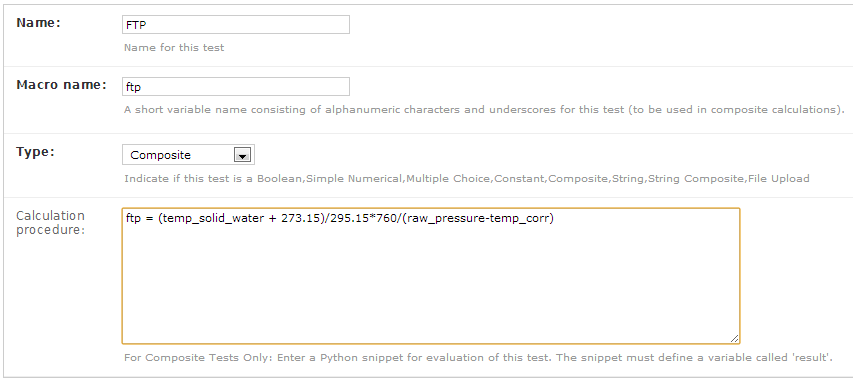
Temperature Pressure Correction Calculation
and second a slightly more complicated multi-line snippet that collects a group of readings and calculates the average value of them.
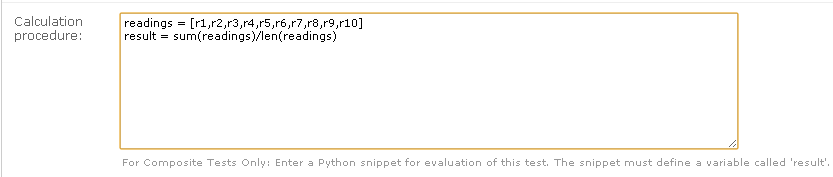
Average Reading Procedure
Note that in both the previous examples the snippets depend on the
values of other tests. In the first, temp_solid_water,
raw_pressure and temp_corr are the macro names corresponding
to Temperature, Pressure and Pressure Correction tests. Likewise
in the second snippet, the average reading result depends on ten other
tests (Readings 1 through 10 with macro names r1, r2...r10).
While the previous two examples are fairly simple, all the control structures of the Python programming language are available including loops, if-else statements, list comprehensions etc.
The composite calculation environment
When your script (calculation procedure) is executed, it has access to
- the current value of all the tests in the current test list being performed
- the Python math module, along with NumPy and SciPy.
- A META variable which is a dictionary of some potentially useful information about the test list currently being performed including:
- test_list_name - Name of current test list
- unit_number - Unit number
- cycle_day - Current cycle day being performed (Always 1 for non-cycle test lists)
- work_completed - Python datetime object with current work_completed value
- work_started - Python datetime object with current work_started value
- username - Username of person performing test
The snippet below shows a composite calculation which takes advantage of the SciPy stats library to perform a linear regression and return the intercept as the result.
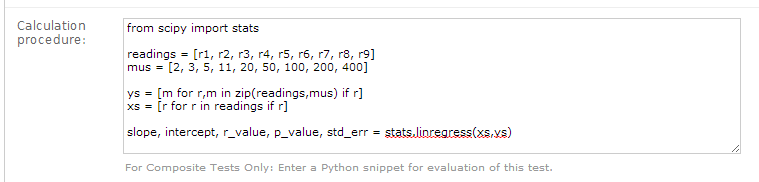
Example procedure using Scipy
NumPy and SciPy provide access to a huge number of robust and fast mathematical functions and it is highly recommended you look through their documentation to see what is available.
An example calculation procedure using the META variable:
unit_number = META["unit_number"]
user = META["username"]

if user == 'bob' and unit_number == 42:
    do_something()
Composite tests made up of other composite tests
QATrack+ has a primitive dependency resolution system and it is therefore safe to create composite values that depend on other composite values as they will be calculated in the correct order.
A note about division for people familiar with Python
In Python versions 2.x the calculation a = 1/2 will result in a
being set to the value 0 and not 0.5 like many people would expect.
This is because Python2.x uses integer
division
by default. This behaviour can be overridden so that
(1/2 == 0.5) == True in Python by adding
from __future__ import division to the top of your Python script.
from __future__ import division is automatically added to every
composite calculation procedure. If you specifically require integer
division you must explicitly use the floor division operator, two
forward slashes (//)
This was done to cut down on confusion caused by people unfamiliar with the way Python handles division as well as provide compatability with the 3.x versions of Python in the future.
String Composite Tests
The String Composite test type are the same as the Composite test type described above with the exception that the calculated value should be a string rather than a number. An example Composite String test is shown below.
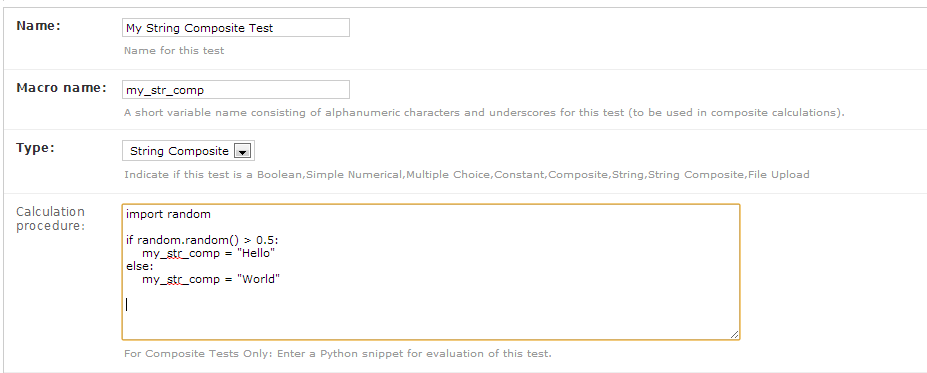
Example String Composite procedure
Upload Tests
Upload test types allow the user to attach arbitrary files (text,
images, spreadsheets etc) which can then be analyzed with a Python
snippet similar to the composite tests above. The uploaded file object
is made available in the calculation context with the variable name
FILE (more information on file objects is available in the Python
documentation.
The calculation procedure can return any JSON serializable object (number, string, list, dict etc) and then (optionally) other composite tests can make use of the returned results. An example of this is given below.
Imagine we have a text file with the following contents:
01/01/2013, 25.1
01/02/2013, 23.2
01/03/2013, 25.2
01/04/2013, 24.0
01/05/2013, 24.0
01/06/2013, 25.5
Where the first column is some dates and the second column is temperature. For our test list we want to upload this file and calculate and save the average (Average Temperature) , max (Maximum Temperature) and min temperatures (Minimum Temperature).
First we define our upload test and procedure for analyzing the file. We
will call our Upload test Temperatures and give it a macro name of
temp_stats.
The calculation procedure we will use is:
temperatures = []
for line in FILE:
    line = line.strip()
    if line.find(',')>=0:            # ignore any line without temperature data
        date, temp = line.split(',') # split up the line into date and temperature columns
        temp = float(temp.strip())   # strip whitespace and convert to float
        temperatures.append(temp)    # add temp to our list

# set our macro_name to a dictionary containing the values
# we are interested in
temp_stats = {
    "max": max(temperatures),
    "min": min(temperatures),
    "avg": sum(temperatures)/len(temperatures),
}
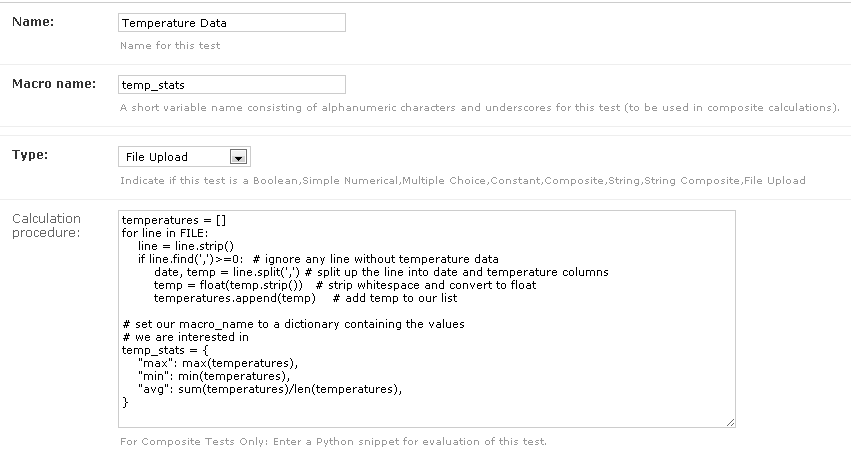
Example upload test type
We can then define three composite tests to store our calculated
results. The calculation procedure required for Average Temp is simply
avg_temp = temp_stats['avg'] and the complete test definition is
shown below:
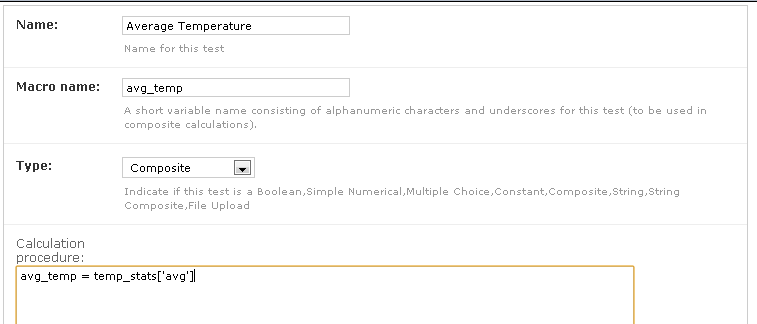
Average temperature test
An example test list made of these 4 tests is shown below as it is being performed:
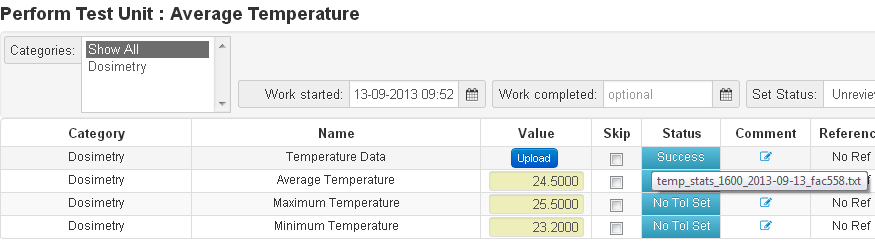
Example upload test in action